
How to calculate AI ROI
Calculate AI ROI from labor hours only: loaded hourly rate, hours per year, automation share, and implementation cost. The formula is public. The defaults are not a customer result.
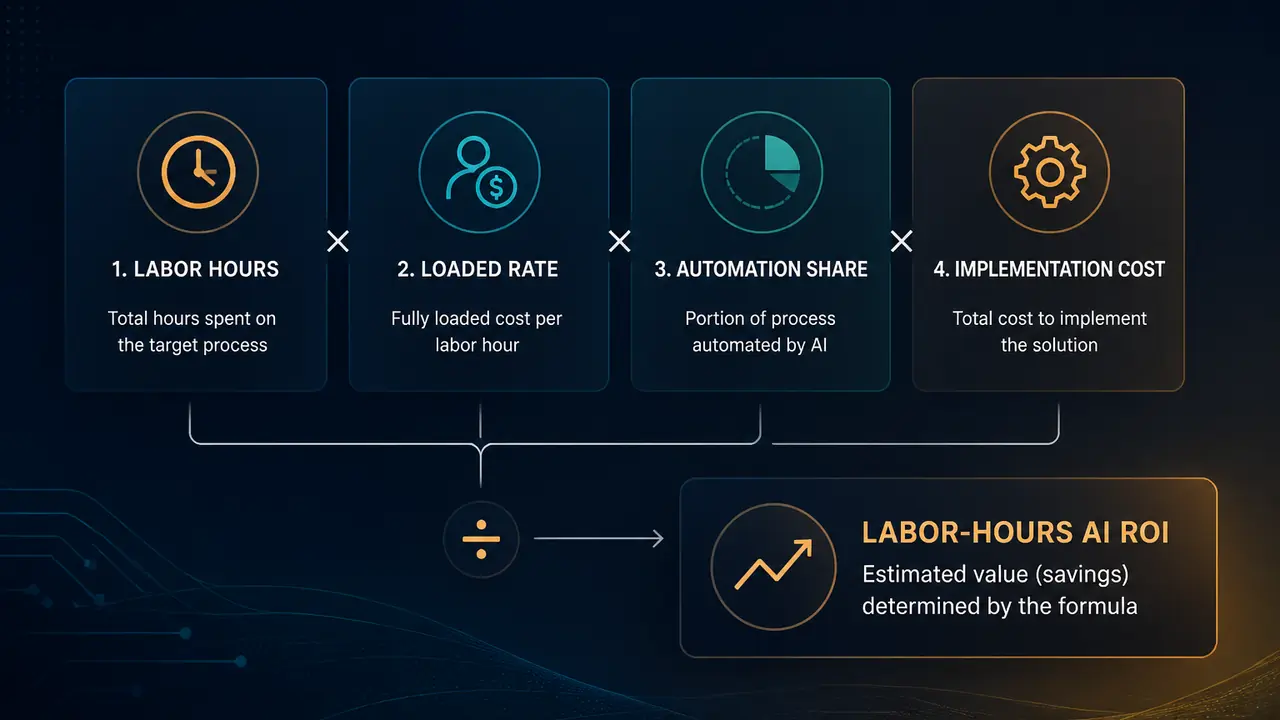
Most AI ROI slides invent a second number. Revenue lift. Fewer errors. Faster cycle time. Those things can be real. They are also easy to make up. If you cannot defend the hours, you cannot defend the rest.
Labor-hours ROI is boring on purpose. You enter how long the work takes, how often it happens, what those people actually cost, how much of the work a system could take, and what you think the build will cost. Annual savings, year-one net, ROI, and payback come from that. Nothing else. The public worksheet is the AI ROI calculator. This post is the same math in prose, so you can audit it without trusting a black box.
The defaults on that page are a worked example, not a customer. We do not publish case-study savings. If someone quotes a percentage without hours, frequency, loaded rate, and cost, they are pitching, not calculating.
Start with labor time, and leave the rest off the page
The question is not "what is AI worth." The question is what this workflow costs in time today, and what share of that time a system could take without lying.
In scope:
- Hours each time the work happens. Team total is fine. Five people at four hours is 20.
- Occurrences per year. Every working day is 260. Weekly is 52. Twice a week is 104. Monthly is 12. Quarterly is 4. Yearly is 1.
- Fully loaded annual compensation, then an hourly rate.
- The share of this workflow you could automate, not a company-wide AI target.
- Implementation cost as your estimate, not a vendor SKU.
Out of scope on purpose:
- Revenue you hope the model will create.
- Error cost you have not measured.
- Compliance exposure you cannot price.
- Cycle-time value that is not also hours.
If you have a source for those extras, bring them to a later conversation. Do not smuggle them into year-one ROI so the slide turns green. A worksheet that says the labor case does not pay back is an honest answer. Many custom builds do not pay back on labor alone in year one. Believe the worksheet.
Write the formula before you open a tool
Hourly rate is annual fully loaded compensation divided by 2,080 hours. That is 40 hours times 52 weeks, the standard US full-time year, and it matches 260 working days times 8 hours. Using 365 calendar days understates the hourly cost. If your teams work a different year, change the compensation so the implied hourly rate is the one you actually pay. Loaded means salary plus the benefits and overhead you actually pay, not the offer letter.
Hours per year is hours each time times occurrences per year.
Hours automatable is that annual total times the automation share.
Annual labor savings is hours automatable times hourly rate. That is time value only.
Year-one net is annual labor savings minus implementation cost.
ROI is year-one net divided by implementation cost.
Payback in months is implementation cost divided by monthly savings (annual labor savings divided by 12). If monthly savings is zero, there is no payback. The formula did not fail. The workflow does not return the cost on labor.
Write the units on one page. Hours. Dollars. A percentage you can defend. A page of adjectives is not math.
Run the public defaults so you can see the arithmetic
The calculator ships with one person, eight hours every working day, half the work automatable, and a $50,000 build. Those are defaults so the example exists without JavaScript. They are not a customer result and they are not a Mufasa quote.
On those inputs:
- Hourly rate is $150,000 divided by 2,080, which is $72.12.
- Hours per year are 8 times 260, which is 2,080.
- Hours automatable are 50 percent of 2,080, which is 1,040.
- Annual labor savings are 1,040 times $72.12, which is $75,000.
- Year-one net is $75,000 minus $50,000, which is $25,000.
- ROI is $25,000 divided by $50,000, which is 50 percent.
- Payback is $50,000 divided by ($75,000 / 12), which is 8 months.
Change one input and the story changes. Cut the automation share to 30 percent and the labor case is thinner. Raise the build cost and year-one ROI can go negative while payback still exists after month 12. Both answers are useful.
Do not present the default row as "companies like yours save $75,000." That would be a lie. Present it as the arithmetic you will replace with your hours.
Be conservative on share, honest on hours, and explicit on cost
Hours each time should be a measured or sampled number, not a workshop guess. Watch the work for a week. If five people touch it, add them. Do not count meetings about the work as the work unless those meetings go away when the system ships.
Frequency should match the calendar, not the wish. "It feels daily" is not 260. If the queue is bursty, use a year of tickets and divide. A process that happens twelve times a year will not pay for a large build on labor. That is a use-case ranking problem, not a calculator problem.
Automation share is a judgment. Measure in shadow mode before you treat the percentage as fact. Document review that still needs a human in the loop is often 30 to 50 percent, not 90. If you do not know, run two percentages and see whether the case still holds. A share you cannot explain in one sentence is a share you should not take to the board.
Implementation cost is whatever you type. It is not a package price. We do not publish SKUs. Real prices come after discovery. Include the work after go-live that you will actually pay for in year one: integration, eval, the people who will run it. If you omit those, the payback is fiction. Build versus buy belongs on the same page as the cost field. Buying a license does not zero the implementation column.
Read a negative year-one number as information
Year-one ROI is sometimes negative because you paid for the build this year and the labor savings accrue over time. Negative year-one ROI with a finite payback means the worksheet breaks even after month 12. Negative ROI with no payback means labor savings never cover the cost.
Neither result is a failure of the formula. Both should change the conversation.
- If payback is finite but long, ask whether you can cut scope, raise the automation share only after a measured shadow period, or wait. Waiting is a valid output.
- If labor never covers the cost, do not invent revenue to rescue the slide. Either the workflow is the wrong first project, or the value is not labor and you need a different case with a source.
- If year-one net is positive on conservative inputs, you still need an owner, a baseline, and a way to count hours after go-live. A green worksheet without a named workflow is still a wish.
There is no universal "good" payback. It depends on cost of delay, risk, and whether labor is the only value you are allowed to count. The useful test is whether the case still holds when you drop the automation share and raise the cost.
Put the worksheet on the first workflow, then measure
Do this for one workflow, not for the company. Company-wide AI ROI is how you get a platform and no hours back.
Before you treat the number as a plan:
- Name the workflow and the owner.
- Write the five inputs and who supplied each one.
- Run the public calculator so someone else can reproduce the row.
- Decide what you will count after go-live (hours per occurrence, occurrences, whether the share held).
- Write the kill rule if the measured share misses the assumption.
After you ship, replace the assumed share with the observed one. If you cannot observe hours, you cannot claim ROI. You can only claim a demo.
Bring hours, loaded cost, and how you chose the share. An engineer can tell you whether the workflow is a build, a wait, or a no. The cost field will still be an estimate until discovery. That is honest.
Run the numbers on the AI ROI calculator. Same formula as this post. No invented customer results.
